

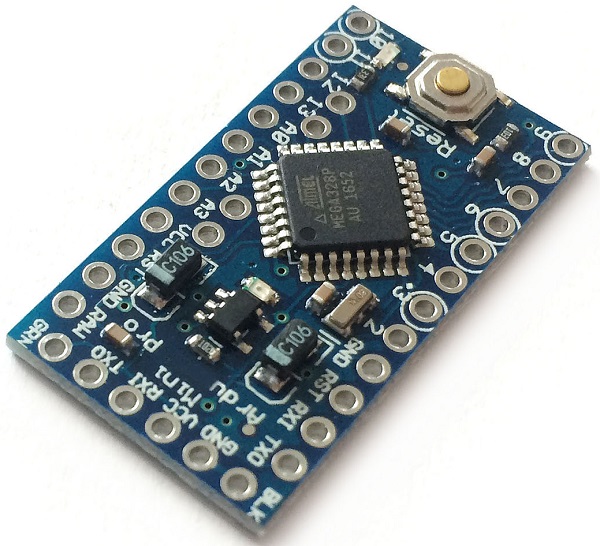
Arduino Pro Mini 3.3V 8mhz (Official)

Product Detail
The Arduino Pro Mini (5V/16MHz) is a compact, breadboard-friendly microcontroller board based on the ATmega328P chip. It operates at 5V logic with a 16MHz clock speed, making it an ideal choice for permanent, space-constrained DIY electronics and robotics projects.
Quick Specifications
Microcontroller: ATmega328P
Operating Voltage: 5V
Clock Speed: 16 MHz
Digital I/O Pins: 14 (6 provide PWM output)
Analog Input Pins: 8
Flash Memory: 32 KB (with 2 KB used by the bootloader)
SRAM: 2 KB
EEPROM: 1 KB
Powering the Board
The board features multiple power pins to accommodate different power sources: [
RAW: Connect an unregulated power supply here. The voltage can range from 3.4V to 12V DC, which the onboard regulator drops to 5V.
VCC: Connect a regulated 5V power supply directly to this pin.
GND: Ground pin.
Programming the Pro Mini
Because of its ultra-compact size, the Pro Mini lacks an onboard USB port. You will need an external USB-to-TTL serial cable (such as a PL2303HX or CP2102) to connect it to your PC.
Connect the USB-to-TTL serial cable/TTL adapter to the 6-pin header at the edge of the board, matching the TXO and RXI pins.
Ensure you have the Arduino IDE downloaded.
In the IDE, go to Tools > Board and select Arduino Pro or Pro Mini.
Set the Processor to ATmega328P (5V, 16MHz)